Database is an organized collection of structure data or information that is stored in such a way that it can be easily accessed , create, update, delete and managed.
Data
Data are raw fact that have no specific meaning.
Information
Information is processed data that has purpose and meaning.


Data Processing
Data is a collection of facts & figures, such as values or measurements. The data is the raw material to be processed by a computer.
Data are manipulated to produce output. When this output can be used to help people make decisions, it is called information.
Data processing is defined as series of actions or operations that convert data into useful information.
Data processing also refers to the complete check of the data validity, accuracy, consistence, integrity and its relevance to the client’s requirements.
Input
Inputis the task where data is coded or converted into machine readable form so that it can be processed through a computer.
Processing
Data processing refers to the collection and manipulation of data to produce meaningful information. It is the process of manipulation data to generate required information. Different method and techniques are used to process the data data.
- classifying,
- sorting,
- calculating,
- summarizing,
- comparing
Output
Outputis presented to users in various report formats like printed report, audio, video, or on monitor.
Storage
Storage is used to store information for future use and reporting
Database Terminology
- Column or Field
- Row or Record
- Table (similar to an Excel Worksheet)
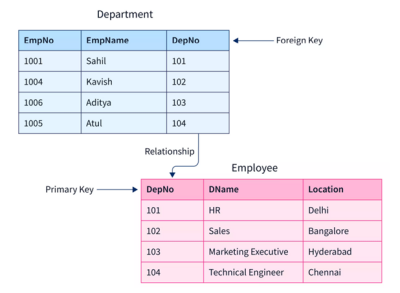
- Primary Key –unique and mandatory
- Foreign Key –a cross-reference between tables because it references the primary key of another table
- Relationship–created though foreign keys.
- Database relation can be :
- One to one (1-1)
- One to many (1-M)
- Many to One (M-1)
- Many to Many (M-M)
Field , Record and Table
Table
A set of data arranged in a columns and rows. The column represent characteristics/properties of stored data and the row represent the actual data entries.
| E_ID | E_NAME | E_SALARY |
| 1 | RAM | 60000 |
| 2 | SHYAM | 45000 |
| 3 | SITA | 56000 |
| 4 | GITA | 70000 |
| 5 | HARI | 80000 |
Field
Fields are columns in a table with specific information about the data.
In above table e_id, e_name and and e_salary are fields that provides the information about id, name and salary of different employees.
Record
Record is a individual entry that exists in a table. It is also known as row.
Records give the complete information of a single entry or entity.
| E_ID | E_NAME | E_SALARY |
| 1 | RAM | 60000 |
| 2 | SHYAM | 45000 |
| 3 | SITA | 56000 |
| 4 | GITA | 70000 |
| 5 | HARI | 80000 |
In above table selected row gives the complete information of about the particular employee sita.
What is Database ?
Database is an organized collection of structure data or information that is stored in such a way that it can be easily accessed , create, update, delete and managed.
A database is usually controlled by a database Management System (DBMS)
In Database, data are organized in row and columns in the form of table.
Most database use structure query language (SQL) for writing and querying data.
SQL , MYSQL, Oracle, Postgresql are the example of database.
What is database mangement System (DBMS)
Database management system (DBMS) is a type of software or tools that helps to manage the database. User can create , maintain, manipulate and retrieve data or information from a single table or group of interrelated table.
DBMS act as an interface between user/application program and database.

Example : Oracle Database , SQL Server, MS-access, Mysql Dbase etc. are used to managed data in DBMS.
DBMS application are Student information system, hospital management system ,Library Management System, customer relationship Management system.
Objectives of the DBMS
- To store mass storage of relevant data.
- To Make the data access easy for the user.
- To eliminate the data redundancy.
- To Make the latest modification to the database available immediately
- Allow for multiple user to be active at one time ( Data can be accessed concurrently)
- The advancement in the database enables to add more data and program to the system
- To protect the data from physical harm and unauthorized access.
- To Maintain Data confidentiality.
How to install sql server in windows
Install SQL Server- Step By Step Guide For Beginners