Self-Service AI with Power BI Desktop is a powerful feature that allows business users to incorporate machine learning insights into their data analysis and reporting workflows using Microsoft Power BI Desktop. Power BI Desktop is a popular business intelligence tool that support to connect various data sources, transform and model the data, and create interactive visualizations and reports.
With the Self-Service AI capabilities in Power BI Desktop, users can leverage machine learning algorithms and models without having to write complex code or rely on data scientists. This empowers business users to gain deeper insights from their data and make data-driven decisions more efficiently.
Some key features and benefits of Self-Service AI with Power BI Desktop:
Automated Machine Learning (AutoML): Power BI Desktop provides an intuitive interface for performing automated machine learning tasks. Users can select a target variable, choose from a range of machine learning algorithms, and let Power BI automatically generate and compare multiple models based on the selected data. This simplifies the process of model creation and selection.
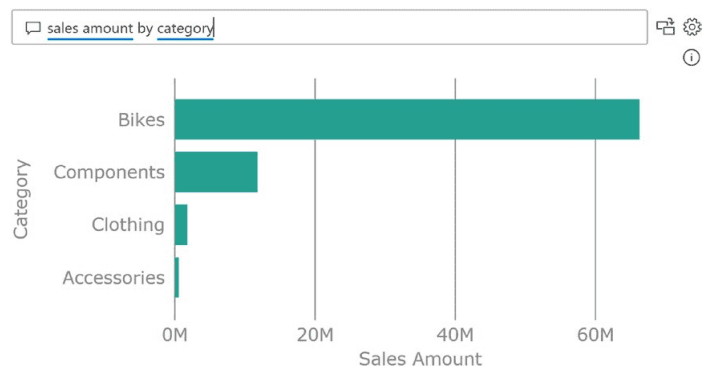
Natural Language Queries: Power BI Desktop supports natural language queries, allowing users to ask questions about their data using everyday language. With AI-powered natural language processing, Power BI can interpret and generate visualizations and insights based on the user’s queries. This feature enables users to explore their data and discover insights more easily.
Smart Data Preparation: Power BI Desktop includes built-in data preparation capabilities that assist users in cleaning and transforming their data for analysis. These smart data preparation features can automatically detect and handle missing values, identify data types, and suggest transformations. This saves time and reduces the effort required for data cleaning and preprocessing.
AI Visuals and Custom Visualization Extensions: Power BI Desktop offers a wide range of AI-powered visuals, such as key influencers, decomposition trees, and anomaly detection. These visuals enable users to uncover patterns, identify influential factors, and detect anomalies in their data. Additionally, users can leverage custom visualization extensions developed by the Power BI community to incorporate advanced AI and machine learning techniques into their reports.
Integration with Azure Machine Learning: Power BI Desktop seamlessly integrates with Azure Machine Learning, Microsoft’s cloud-based machine learning platform. This integration allows users to deploy and consume machine learning models created in Azure Machine Learning directly within Power BI Desktop. Users can leverage the power of Azure Machine Learning’s advanced capabilities while benefiting from Power BI’s interactive reporting and visualization features.
By combining the self-service capabilities of Power BI Desktop with AI and machine learning, businesses can democratize data science and enable business users to gain deeper insights and make data-driven decisions more effectively. Self-Service AI with Power BI Desktop empowers users to leverage the power of machine learning without requiring extensive technical expertise, thus driving innovation and improving business outcomes.